Walsh App Features
Your Favourite Features look even better
Everything you already love, just redesigned for clarity and ease. Watch the complete playlist here.
Notices
All communication from Walnut School is sent on the WalSH App. You get notifications once you get a message. It's a good practice to check your WalSH notifications at least once a day - as we believe in clear and frequent communication. If you have more than one child studying in Walnut School, you will see tags of different colors for each child, like so: Child 1, Child 2. This helps you clearly see which message is for which child. Watch tutorial
Curriculum Updates
This is an innovative feature of the Walnut Learning System. You as parents come to know details of what your child is learning on a daily basis. See worksheets, presentations, classwork, homework, answer sheets and all the other curricular activities details from this section. (Note: These are also available for the students from their Walmiki app too!). Watch tutorial
Fees
Pay fees and download receipts anytime.
Student Profile
Update your child's editable information easily. The tile background of your child's profile is of the house colour. You are not allowed to change certain fields like name, class etc. Those are managed by the school team. Watch tutorial
Results
Access results instantly by academic year and exam. Watch tutorial
Gallery
Walnut School has a lot of events 🙂. You can relive these memories by viewing, downloading and sharing event photos. Every event that happens at Walnut is through a system. If your child's class had an event, you will find that listed here with a lot of photos taken. Not only that, even photos of the carnival are displayed via this section. Watch tutorial
PTMs
Another unique feature of Walnut School - where we let parents attend PTMs online from the convenience of their office or home - that too subject-wise! You can access the meeting links from this section. You also get multiple meeting reminders before the PTMs start to remind you from your busy schedule. Watch tutorial
Bonafide Certificate
Sometimes you require bonafide certificates for various purposes like Aadhaar or passport. Via this feature, you can request and download instantly - with just a few taps! No visiting school during office hours is required. Watch tutorial
Absent Note & Early Pickup
Send notes or requests directly from the app. This is a very important feature of the app - which helps us keep track of absences and early pickups. That prevents confusion that may arise with the transport vendor (they use an internal app to keep track of this). Absent Note tutorial | Early Pickup tutorial
School Calendar
We pride ourselves in being very organised. All important events are available on our Google Calendar online for your easy reference. You can check monthly events, holidays, and unit tests in this calendar. You also have a printed version of the calendar with you - but this calendar has the latest updates (as there might be some last minute contingency changes which might occur).
Class Participation & Homework
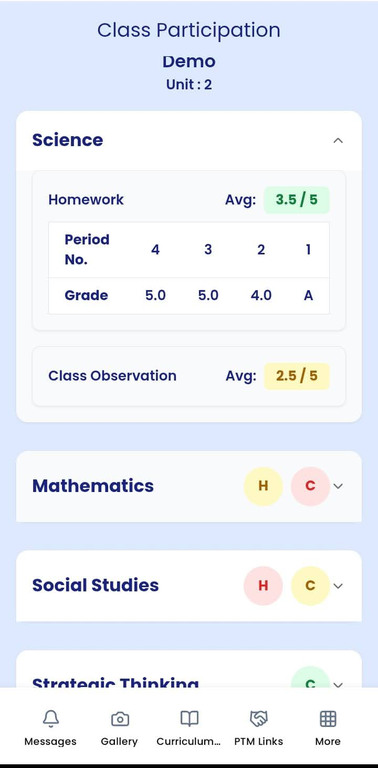
You can now get a clearer understanding of your child's learning journey through the Class Participation & Homework Insights feature.
C (Classroom Participation): Is my child paying attention in class? Find out how your child engages in the classroom based on the teacher's inputs for each unit. Teachers carefully record how well the child is responding in class for every subject (on a scale of 0 to 5) and you can see those observations through this view. Watch tutorial
H (Homework): Is my child regular in submitting homework? Now you can track each homework assignment and its corresponding submission and the quality of work that the child has turned in. Teachers grade on a scale of 0 to 5. You can also view the child's homework scores averaged out for the subject in this view. Watch tutorial